Stop the Shutdowns.
Silence the Noise.
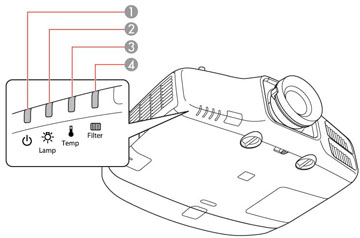
Is your Epson projector running loud, flashing red "Temp" lights, or shutting down randomly? This is a critical thermal failure. We restore your cooling system before heat destroys the optical engine.
Critical Failure: Thermal Breach
When fans fail or sensors drift, the mainboard triggers an emergency shutdown to save the 3LCD panels.
Identifying the Fault
Flashing "Temp" Light
A rapidly flashing red indicator usually means a fan has stalled (0 RPM) or a thermal sensor has detected a temperature spike beyond the safety threshold.
Grinding / Loud Noise
A loud whirring or grinding sound indicates Bearing Failure in one of the intake or exhaust fans. If left unchecked, the fan will seize, causing immediate overheating.
Random Shutdowns
If the unit runs for 2-10 minutes and then powers off completely, this is the Thermal Protection Circuit. It often points to dried thermal paste or a clogged internal air tunnel.
Why "Just Cleaning the Filter" Fails
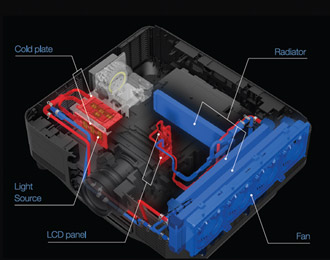
Projector cooling is complex. It's not just about air; it's about thermal transfer. Over time (3-5 years), the thermal paste between the DMD/LCD chips and their heatsinks dries out and turns to powder.
When this happens, even if your fans are running at 100%, the heat cannot escape the chip. The sensor detects the core temperature rising and cuts power to prevent the panels from melting. Additionally, on high-end Laser models, the liquid cooling fluid can degrade or cavitate, requiring a loop flush.
Warning: Ignoring a loud fan or flashing temp light will eventually lead to permanent optical damage (yellow/pink burn) or mainboard failure. Early repair is significantly cheaper.
Our Cooling Restoration
We return your projector to factory thermal specs.
Sonic Air-Path Cleaning
We use high-pressure ionised air and ultrasonic tools to clear deeply embedded micro-dust from the heat exchanger fins, restoring airflow efficiency.
MagLev Fan Upgrade
We replace grinding fans with high-grade Magnetic Levitation or Fluid Dynamic Bearing fans. These run quieter and last longer than standard sleeve-bearing fans.
Thermal Paste Renewal
We remove old, dried compound and apply industrial-grade high-conductivity thermal paste to ensure heat transfers instantly from the chips to the heatsinks.
Thermal Soak Test
Your projector is run at max brightness for 24 hours while we monitor internal sensor data to guarantee it remains cool and stable under load.
Common Questions
Can I just vacuum the vents myself?
Why is my projector fan so loud?
Do you repair liquid-cooled laser models?
Cool Down Your Projector
Don't let heat cook your expensive optics. Send it in for a professional thermal service.
Book Free Assessment