Fixing the Epson
Pink & Yellow Tint.
Is your image looking discoloured, with yellow patches on white backgrounds or a pink hue over black? This is a classic 3LCD optical failure. We don't just replace parts; we rebuild the engine.
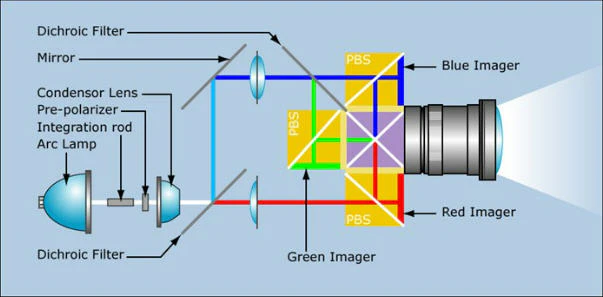
The Culprit: Polarizer Burn
This specific component failure blocks the blue light channel, causing the yellow/pink discoloration on screen.
Identifying the Fault
Yellow Discoloration
Whites appear mustard yellow or greenish. This indicates the Blue Polarizer has failed, filtering out blue light from the white spectrum.
Pink/Magenta Haze
Blacks or dark scenes have a pinkish glow. This is often a sign that the Green Panel alignment has shifted or the Green Polarizer is leaking light.
Coloured Blobs
Fuzzy, out-of-focus coloured spots (usually red or blue) visible on black screens. This is Dust Contamination inside the sealed prism block.
Why does the image turn Yellow?
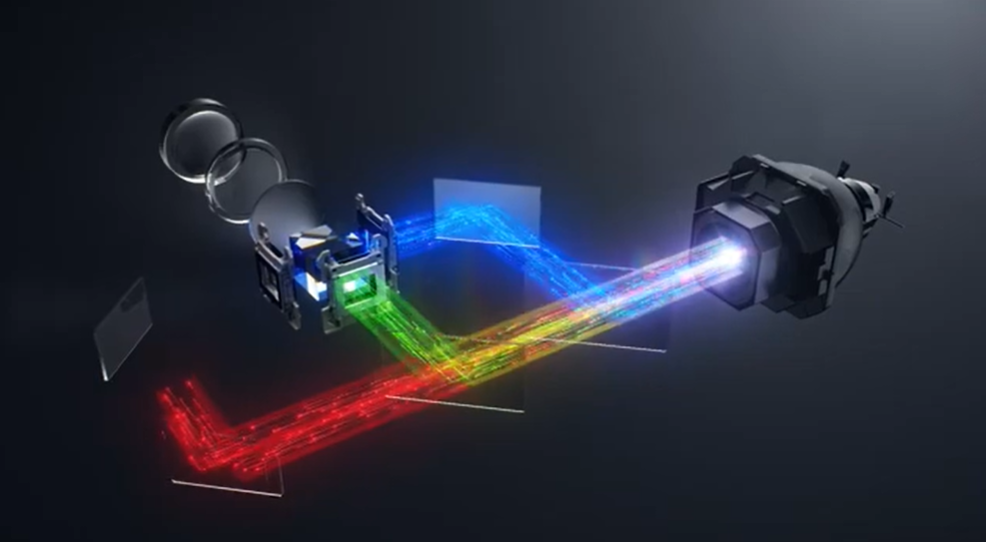
It comes down to physics. Inside your Epson 3LCD projector, white light is split into Red, Green, and Blue. The Blue Channel carries the highest energy (shortest wavelength, highest UV intensity).
Over time, this high-energy light literally "cooks" the organic polarizer film located before the blue LCD panel. As the film burns, it turns brown/yellow. Instead of polarizing the light, it acts as a yellow filter, blocking the blue image data.
N.B. High-end grade professional Epson projector optical assemblies can cost several hundred pounds to replace entirely. Our component-level service restores your existing engine, avoiding this significant expense.
Our Restoration Process
We upgrade your unit to be better than new.
Inorganic Upgrade
We don't fit the same organic parts that failed. We install Inorganic Quartz Polarizers. These glass-based filters are virtually immune to UV degradation, ensuring the yellow tint never returns.
Ultrasonic Bath
The Prism Block and Light Tunnel are removed and cleaned in an ultrasonic bath to remove the microscopic dust layer that causes "soft" focus and contrast loss.
6-Axis Alignment
Using a digital pattern generator, we micro-align the LCD panels to the prism to ensure perfect convergence. No more red/green halos around white text.
Colour Calibration
We reset the mainboard's gamma curves and white balance settings to match the new optics, restoring Rec.709 colour accuracy.
Common Questions
Is it worth repairing an older model with this fault?
Will the yellow tint come back?
Can I just replace the bulb to fix the colour?
Restore Your Image Today
Send us your unit for a free assessment. If we can't fix the colour, you don't pay.
Book Free Assessment